Flashcards: Take 3, part 2
I’ve found myself really motivated to keep working on this, so I may as well keep documenting it in case anyone else cares.
Day 4
One of my concerns around the design of this application is it’s reliance on Gtk.ListBoxes. I use ListBoxes because they allow me to create each row as it’s own widget with it’s own variables and dynamic interactions, meaning each row can contain more widgets and moving parts if I wanted. However, I worry that having so many complex widgets being created and stored could be both memory intensive and slow down the interface. From what I’ve seen, GTK3 can handle quite a high number of widgets before it starts to slow down, but for future proofing’s sake I’ve avoided making the ListBoxRows /too/ complicated. If we lived in an perfect world where I never needed to worry about overhead, I’d love each Row to contain it’s own CardEditor. Instead of editing cards in it’s own interface, the user would press the + button and a new card would appear, with GtkEntrys instead of labels for the front, hint, and back.
Previously, editing cards was done through a popup window. This window contained the old card’s details, and 3 entries for the new details. I might see about replacing this with something more intuitive, as this wasn’t particularly user friendly. My intitial card adding interface was designed for speed: I wanted the user to be able to populate their Decks as fast as possible. While adding new cards was very fast and intuitive, editing cards wasn’t a particularly positive experience.
Day 5
I implimented what I was thinking about in Day 4 and I hated it!
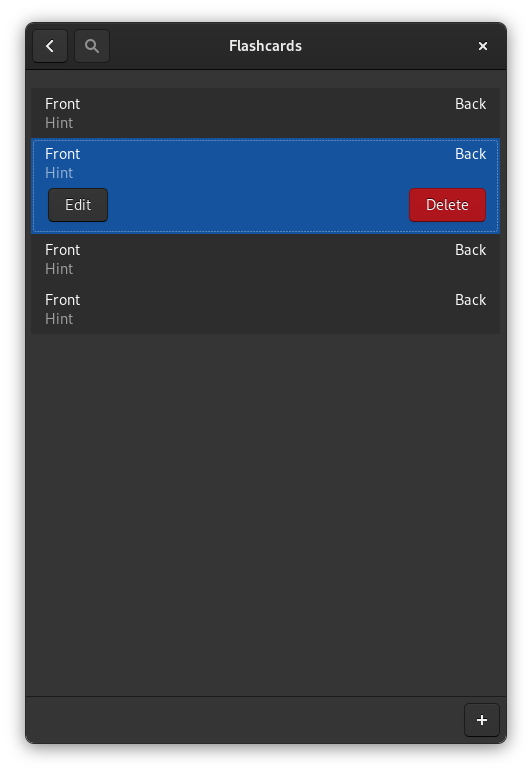
OK maybe hate is a little strong, but it definitely needs work. I’m not sure I prefer it to the old design. On one hand, it’s far more obvious what these actions relate to as the list box is single select so the card to be edited or deleted is bright blue. On the other hand, it’s a lot of space to show 2 buttons. Perhaps a android~esque sideways sliding revealer (think gmail when you slide an e-mail to delete it) with icons could work? but that would use alot of horizontal space on an app we’re trying to make work on small form factors and large.
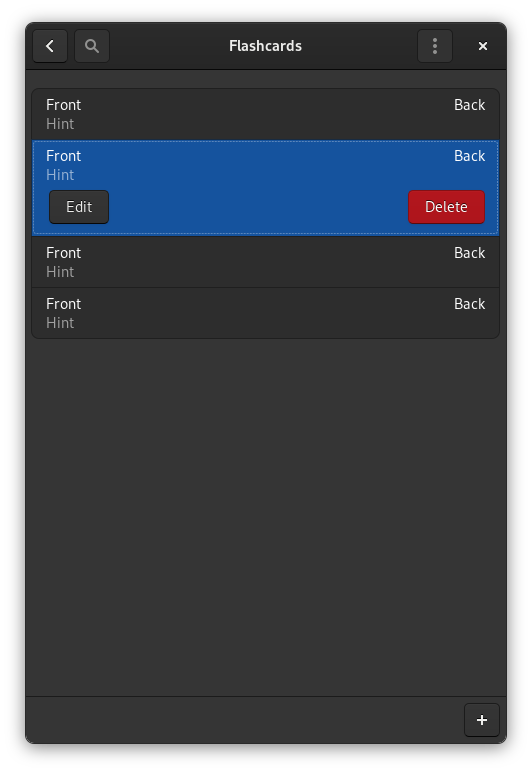
I also discovered the “content” CSS class for GtkListBoxes. This style class gives ListBoxes and their rows some pretty formatting, rounded corners, and separators basically for free. I wish I had discovered this sooner, but unfortunately it’s just one of those useful CSS styles hidden in GTK. I only found it through GNOME Games, which uses it in it’s preferences window to show the different consoles it has available (well, really it uses them throughout the whole preferences window). It looks very pretty!
Day 6
2 months have passed since I last dedicated time to Flashcards. Today (17th December 2020) GTK4 was officially released. I’ve also spotted that there is a WIP merge request for GTK4 support for libhandy, which when it works will mean I can safely port my application to GTK4!
I thought about giving this branch a try and porting the application to GTK4 with the current WIP implementation. However, porting to GTK4, even with an early stage app, is no small task. Immediately, I’ll need to convert all .UI files to GTK4 (which can be done with gtk4-builder-tool --3to4). Not only that, a quick look through the porting guide tells me I’ll need to replace all my container.add() calls. It was at this point I noticed an incredibly embarrassing mistake I’d made thus far - I haven’t put this into a git repository yet! This needs to be fixed immediately.
I had an empty git repository ready for this project, so I added all the project files into that repository so I could move onto porting to GTK4. I added a second Flatpak manifest that could build the necessary libraries for a GTK4 port, specifically a GTK4 version of libhandy (which is not yet merged) and a version of PyGObject with the correct overrides for using GTK4 with templates (also not yet merged, although hopefully merged soon). However, even with a up to date PyGObject, it seems that the Python defaults to the version shipped with the current flatpak SDK rather than the version I’ve compiled. Thankfully, someone commented on the Merge request and confirmed my suspicions, and we simply needed to add the location of our compiled PyGObject to the PYTHONPATH variable. Finally, the application launches! Well, not quite. Now I need to remove all the deprecated functions!
As Flashcards wasn’t the most complex app in it’s current state, getting it ported to GTK4 was… shockingly simple? My main window file creates most of the complex widgets and adds them, so I commented most of the widgets out and added them back one at a time; each time I’d add one I’d get more errors that needed to be resolved. Most of the issues were fairly common across UI files, simple stuff like show_close_button being changed to show_title_buttons, removing “packing”, removing any child properties, and other assorted changes. For the most part I just removed or commented out the lines that caused issues if I didn’t know how to immediately resolve them. A few changes to the code to remove missing functions, and the application launched!
Unsuprisingly given that I’m using a freshly released GTK4, an unfinished GTK4 branch of libhandy, and a prereleased PyGObject, and the fact I haven’t even started porting any of the broken functionality from the transition from GTK3 to GTK4, it’s a giant mess! Admittedly most of the glitchiness comes from the fact libhandy’s GTK4 branch just isn’t there yet. The initial state is a completely white quircle until you resize the window (an issue with Hdy.Leaflet), where it finally draws all the widgets. However, quite a few things are in the wrong place because their position was managed with child properties which are gone!
Coincidentally, close to the release of GTK4 there was some discussion around the use of the Glade GTK interface designer to build your application’s interface. The consensus seems to be that unless someone dedicates time to work on Glade, developers should simply maintain their UI files by manually writing and editing the XML files. From some discussions I’ve seen in Matrix/IRC, some core GNOME contributors say this is how they work, but I think this is an incredibly poor response. Asking application developers to simply maintain the XML files manually isn’t exactly developer friendly. In the past I only edited the XML files if I needed to make a small quick change. Glade is a pretty great program, and I used it frequently when prototyping the interface for Flashcards. I can maintain the XML files, and going forward it seems like I will not have any other choice, but I’m not happy about it at all. When I next need to add a widget, I’ll likely still use Glade, but convert the file and manually add any libhandy widgets.
Day 7
With the move to GTK4 somehow working, time to fix a bunch of the things that broke.
First, a every time I had a box and I used GtkBox’s child properties to specify that a child is at the end is now gone, but now it depends on the parent widget. For example, when using a GtkHeaderbar, you can specify that a child should appear at the end of the title by changing <child> to <child type="end">.
When it comes to children of a box, usually it can simply be fixed by setting the correct children to have hexpand=true. Simple enough.
Another change that I didn’t remember reading about but I’m kind of happy about is replacing GtkPopover menus (which used to be created manually, with a GtkPopover, a bunch of GtkModelButtons and GtkSeparators) with a properly defined menu. Now you can define the menu as part of the .ui file in a format like:
<menu id="deck_list_menu">
    <section>
        <item>
            <attribute name="label" translatable="yes">New Deck</attribute>
            <attribute name="action">win.create-deck</attribute>
        </item>
    </section>
    <section>
        <item>
            <attribute name="label" translatable="yes">About Flashcards</attribute>
            <attribute name="action">win.show-about</attribute>
        </item>
    </section>
</menu>
Then you can set a MenuButton to use that menu model, and GTK will create the popover and populate it for you! This is one of those things that took me a while to get working correctly, but now I understand it I think it’s absolutely brilliant. No longer do I need to mess around with creating the popover, adding the right padding to each edge to match the HIG, and assigning it to the MenuButton. I simply define the menu, and the Popover is created for me with the correct styling. This might sound daft, but this makes me really happy; this is way more intuitive.
I think I’ll end these few days here, but there’s one more thing I think it worth pointing out; Sometimes when I want to figure out how to implement something I’ll look at other apps to see how they do it. In the case of porting to GTK4, at the time of writing the only working GTK4 app I could find is Souk, a Flatpak app store written in Rust. Today I found out you cannot simply create or define GtkModelButtons anymore, so I went to find out how Souk implemented it’s menu. Using the inspector, I found out it DID use GtkModelButtons. Confused, I looked at it’s .ui files and realised that it didn’t define the buttons itself, and this was how I learned that you can define menus in this new way.
I knew GTK was heading towards a more Action oriented design, so I looked for blog posts and found this blog on blogs.gtk.org titled Custom widgets in GTK 4 – Actions, which basically explained most of what I just described. The critical thing it missed was that whilst you can define your menu in your .ui file, you can also define where it is used in your .ui file, and it is exceedingly simple.
<child type="end">
    <object class="GtkMenuButton" id="deck_menu">
        <property name="menu_model">deck_list_menu</property>
        <property name="icon_name">open-menu-symbolic</property>
    </object>
</child>
And with that, the menu is defined entirely in the .ui file, all I need to do is define the actions.